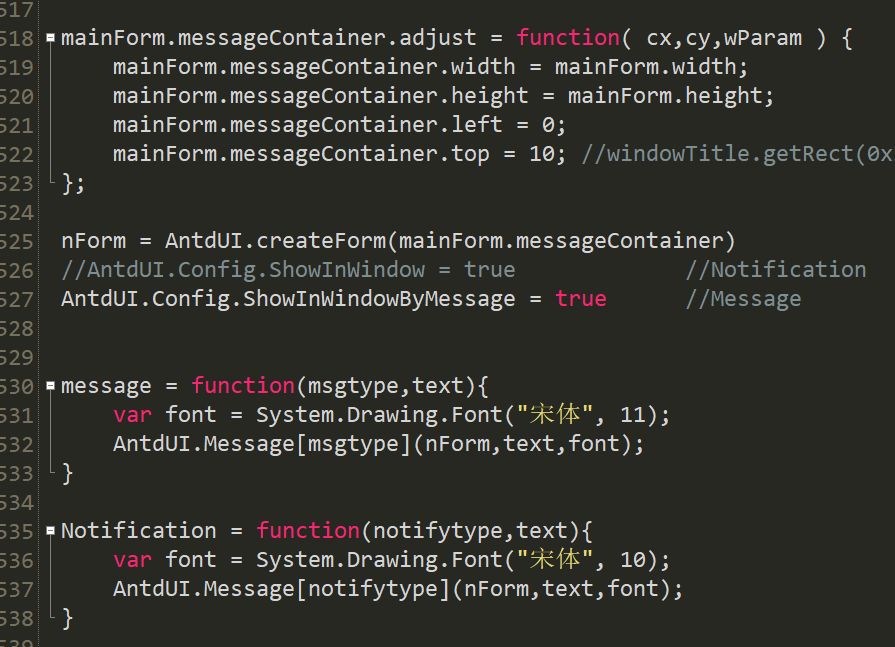
在Alert控件中需要注意,内置的几种样式(Success
、Warn),他是需要通过赋值.Icon成员函数来实现。
 import win.ui;
import dotNet;
import dotNet.AntdUI;
dotNet.import("System.Windows.Forms");
dotNet.import("System.Drawing");
/*DSG{{*/
var winform = win.form(text="AntdUI Alert";right=760;bottom=679;border="thin")
winform.add(
custom_base={cls="custom";left=0;top=0;right=760;bottom=679;ah=1;aw=1;db=1;disabled=1;dl=1;dr=1;dt=1;hide=1;z=1};
custom_close_alert={cls="custom";left=384;top=386;right=720;bottom=466;dl=1;dr=1;dt=1;z=11};
custom_desc={cls="custom";left=24;top=56;right=738;bottom=84;dl=1;dr=1;dt=1;z=3};
custom_error={cls="custom";left=24;top=286;right=720;bottom=326;dl=1;dr=1;dt=1;z=8};
custom_info={cls="custom";left=24;top=186;right=720;bottom=226;dl=1;dr=1;dt=1;z=6};
custom_lbl_basic={cls="custom";left=24;top=104;right=280;bottom=130;dl=1;dt=1;z=4};
custom_lbl_more={cls="custom";left=24;top=350;right=280;bottom=376;dl=1;dt=1;z=9};
custom_loop_alert={cls="custom";left=24;top=482;right=720;bottom=522;db=1;dl=1;dr=1;z=12};
custom_success={cls="custom";left=24;top=136;right=720;bottom=176;dl=1;dr=1;dt=1;z=5};
custom_title={cls="custom";left=24;top=18;right=420;bottom=52;dl=1;dt=1;z=2};
custom_title_alert={cls="custom";left=24;top=386;right=360;bottom=466;dl=1;dt=1;z=10};
custom_warn={cls="custom";left=24;top=236;right=720;bottom=276;dl=1;dr=1;dt=1;z=7}
)
/*}}*/

// ---------- 1. Embedded AntdUI container ----------
// Message / Modal / Notification 等需要 AntdUI 窗体或控件作为 owner。
var baseForm = AntdUI.BaseForm();
baseForm.FormBorderStyle = System.Windows.Forms.FormBorderStyle.None;
baseForm.Dock = System.Windows.Forms.DockStyle.Fill;
dotNet.setParent(baseForm, winform.custom_base);

// ---------- 2. Fonts ----------
var fontTitle = System.Drawing.Font("Microsoft YaHei", 16, System.Drawing.FontStyle.Bold);
var fontHeader = System.Drawing.Font("Microsoft YaHei", 11, System.Drawing.FontStyle.Bold);
var fontNormal = System.Drawing.Font("Microsoft YaHei", 10);
var fontTip = System.Drawing.Font("Microsoft YaHei", 9);

var fill = System.Windows.Forms.DockStyle.Fill;

// ---------- 3. Helpers ----------
var makeLabel = function(host,text,font){
    var label = AntdUI.Label(host);
    label.Dock = fill;
    label.Text = text;
    label.Font = font || fontNormal;
    return label;
}

var makeAlert = function(host,text,icon,title,closeIcon){
    var alert = AntdUI.Alert(host);
    alert.Dock = fill;
    alert.Text = text;
    alert.Font = fontNormal;
    alert.Icon = icon;
    alert.Radius = 6;
    alert.BorderWidth = 1;

    if(title){
        alert.TextTitle = title;
    }

    if(closeIcon){
        alert.CloseIcon = true;
    }

    return alert;
}

// ---------- 4. Labels ----------
makeLabel(winform.custom_title,"Alert",fontTitle);
makeLabel(
    winform.custom_desc,
    "Displays information that requires attention. Common properties: Text, TextTitle, Icon, CloseIcon, BorderWidth, Loop.",
    fontTip
);

makeLabel(winform.custom_lbl_basic,"Basic alert types",fontHeader);
makeLabel(winform.custom_lbl_more,"More alert examples",fontHeader);

// ---------- 5. Basic alerts ----------
var alertSuccess = makeAlert(
    winform.custom_success,
    "Success Text: operation completed successfully.",
    AntdUI.TType.Success
);

var alertInfo = makeAlert(
    winform.custom_info,
    "Info Text: this is an informational message.",
    AntdUI.TType.Info
);

var alertWarn = makeAlert(
    winform.custom_warn,
    "Warning Text: please check your configuration.",
    AntdUI.TType.Warn
);

var alertError = makeAlert(
    winform.custom_error,
    "Error Text: something went wrong, please try again.",
    AntdUI.TType.Error
);

// ---------- 6. Alert with title ----------
var alertWithTitle = makeAlert(
    winform.custom_title_alert,
    "This alert contains title and description text.",
    AntdUI.TType.Info,
    "Info with title"
);

// ---------- 7. Closeable alert ----------
var alertClose = makeAlert(
    winform.custom_close_alert,
    "Click the close icon on the right side.",
    AntdUI.TType.Warn,
    "Closeable warning",
    true
);

// ---------- 8. Loop text alert ----------
var alertLoop = makeAlert(
    winform.custom_loop_alert,
    "Loop alert: this is a long notice text. It can scroll automatically when Loop is enabled.",
    AntdUI.TType.Success
);

alertLoop.Loop = true;
alertLoop.LoopSpeed = 12;
alertLoop.LoopPauseOnMouseEnter = true;

// ---------- 9. Click events ----------
alertSuccess.Click = function(sender,e){
    AntdUI.Message.success(baseForm,"Success alert clicked.");
}

alertInfo.Click = function(sender,e){
    AntdUI.Message.info(baseForm,"Info alert clicked.");
}

alertWarn.Click = function(sender,e){
    AntdUI.Message.warn(baseForm,"Warning alert clicked.");
}

alertError.Click = function(sender,e){
    AntdUI.Message.error(baseForm,"Error alert clicked.");
}

alertWithTitle.Click = function(sender,e){
    AntdUI.Message.info(baseForm,"Title alert clicked.");
}

alertClose.Click = function(sender,e){
    AntdUI.Message.warn(baseForm,"Closeable alert clicked.");
}

alertLoop.Click = function(sender,e){
    AntdUI.Message.success(baseForm,"Loop alert clicked.");
}

// ---------- 10. Dispose ----------
winform.onClose = function(){
    fontTitle.Dispose();
    fontHeader.Dispose();
    fontNormal.Dispose();
    fontTip.Dispose();

    return true;
}

winform.show();
win.loopMessage();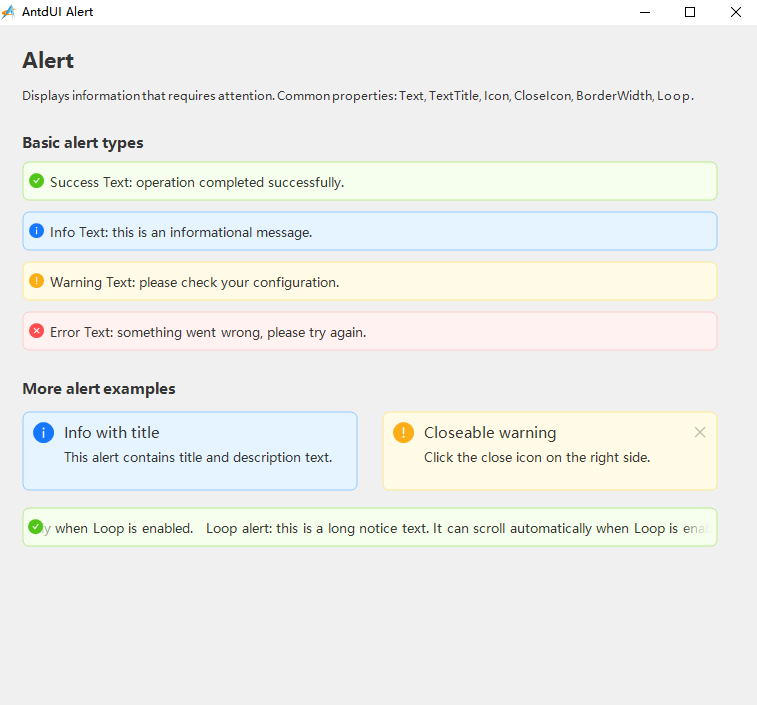
下期预告:Table表格控件的创建和事件响应