网上找了一个opencv_aardio库(https://github.com/xuncv/opencv_aardio),折腾了半天,才配置好环境,为了更好的测试效果,对原库部分代码也进行了一些修改😏。
opencv确实强大,试了一下YOLO-tiny模型,虽然识别的准确度不高(可能因为版本问题,这个库目前不支持onnx),但还是挺惊艳的!~~
现在,完整cv2库文件也分享给大家,大家可以少走弯路(坑我已经踩过了😂),直接import调用即可,我们一起探索opencv的世界吧:
【点击下载】:cv2.7z (访问密码: 1345)
(下载后,解压,放在arrdio文件夹的"\lib\"目录下就可以用了)
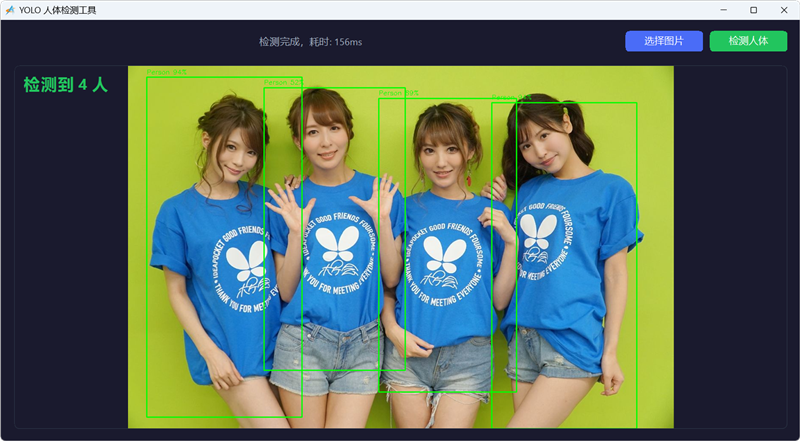
 // opencv + YOLOv4-tiny模型 识别照片中的人物 @Mr_MAO
import win.ui;
import cv2;
import fsys.dlg;
/*DSG{{*/
var winform = win.form(text="YOLO 人体检测工具";right=899;bottom=599;bgcolor=0x2E1A1A)
winform.add(
btnDetect={cls="plus";text="检测人体";left=761;top=17;right=881;bottom=49;bgcolor=0x5EC522;border={radius=6};color=0xFFFFFF;disabled=1;dr=1;dt=1;font=LOGFONT(h=-14);notify=1;z=2};
btnOpen={cls="plus";text="选择图片";left=631;top=17;right=751;bottom=49;bgcolor=0xF76C4A;border={radius=6};color=0xFFFFFF;dr=1;dt=1;font=LOGFONT(h=-14);notify=1;z=1};
imageView={cls="plus";left=21;top=70;right=881;bottom=581;bgcolor=0x1A0F0F;border={color=0x48372D;radius=8;width=1};db=1;dl=1;dr=1;dt=1;repeat="scale";z=3};
infoOverlay={cls="bkplus";left=32;top=80;right=383;bottom=119;align="left";color=0x5EC522;dl=1;dt=1;font=LOGFONT(h=-24;weight=700);z=4};
statusText={cls="bkplus";text="YOLO 图像检测";left=25;top=20;right=599;bottom=48;color=0xC0AEA0;dl=1;dr=1;dt=1;font=LOGFONT(h=-14);z=5}
)
/*}}*/

// ====== 界面样式 ======
winform.btnOpen.skin({ background={default=0xFF4A6CF7;hover=0xFF5B7CF8;active=0xFF3A5CE7} })
winform.btnDetect.skin({
    background={default=0xFF22C55E;hover=0xFF32D56E;active=0xFF18B54E;disabled=0xFF555555}
})

// ====== 全局配置与状态 ======
var modelDir = io.fullpath("~/lib/cv2/.res/model/");
io.createDir(modelDir);

// YOLOv4-tiny Darknet
var cfgPath = modelDir + "yolov4-tiny.cfg";
var weightsPath = modelDir + "yolov4-tiny.weights";

var currentMat = null; // 当前图片 Mat
var globalNet = null;  // 缓存的 DNN 网络模型

// ====== 函数:显示图片 ======
var updateDisplay = function(mat){
    if(!mat || mat.empty()) return;

    var bgra = cv2.cvtColor(mat, cv2.COLOR_BGR2BGRA);
    var bytes = bgra.toBytes();
    var bmp = gdip.bitmap(bgra.cols, bgra.rows, 0x26200A, bytes, bgra.cols * 4);
    winform.imageView.background = bmp;
    bgra.release();
}

// ====== 函数:加载 YOLOv4-tiny Darknet 模型 ======
var loadNetwork = function(){
    if(globalNet) return true;

    if(!io.exist(cfgPath) || !io.exist(weightsPath)){
        winform.statusText.text = "模型文件不存在,请等待模型准备完成";
        winform.statusText.redraw();
        return false;
    }

    var cfgSize = io.getSize(cfgPath);
    var weightsSize = io.getSize(weightsPath);
    if(cfgSize < 100 || weightsSize < 5000000){
        winform.statusText.text = "模型文件不完整,正在重新准备...";
        winform.statusText.redraw();
        io.remove(cfgPath);
        io.remove(weightsPath);
        return false;
    }

    winform.statusText.text = "正在载入 AI 模型到内存...";
    winform.statusText.redraw();

    var net = null;
    try {
        net = cv2.readNetFromDarknet(cfgPath, weightsPath);
    }
    catch(e){
        winform.statusText.text = "模型加载失败: " + (e || "未知错误");
        winform.statusText.redraw();
        return false;
    }

    if(!net || net.empty()){
        winform.statusText.text = "模型文件损坏,正在重新准备...";
        winform.statusText.redraw();
        io.remove(cfgPath);
        io.remove(weightsPath);
        return false;
    }

    net.setPreferableBackend(cv2.DNN_BACKEND_OPENCV);
    net.setPreferableTarget(cv2.DNN_TARGET_CPU);

    globalNet = net;
    winform.statusText.text = "模型加载成功,可以开始检测";
    winform.statusText.redraw();
    winform.btnDetect.disabled = false;
    return true;
}

// ====== 函数:后台下载模型 ======
var downloadModel = function(){
    thread.invoke(
        function(winform, cfgPath, weightsPath, modelDir){
            import web.rest.client;
            var http = web.rest.client();

            // YOLOv4-tiny cfg
            var cfgUrl = "https://raw.githubusercontent.com/AlexeyAB/darknet/master/cfg/yolov4-tiny.cfg";
            // YOLOv4-tiny weights
            var weightsUrl = "https://github.com/AlexeyAB/darknet/releases/download/darknet_yolo_v4_pre/yolov4-tiny.weights";

            winform.statusText.text = "正在下载 YOLOv4-tiny 模型 (约 23MB)...";

            // 下载 cfg
            var ok = http.receiveFile(cfgPath).get(cfgUrl);
            if(!ok || io.getSize(cfgPath) < 100){
                winform.statusText.text = "下载 cfg 失败,请检查网络连接";
                return;
            }

            // 下载 weights
            ok = http.receiveFile(weightsPath).get(weightsUrl);
            if(!ok || io.getSize(weightsPath) < 5000000){
                winform.statusText.text = "下载 weights 失败,请检查网络连接";
                return;
            }

            winform.statusText.text = "模型下载完成,正在加载...";

        }, winform, cfgPath, weightsPath, modelDir
    );
};

// ====== 函数:模型准备入口 ======
var prepareModel = function(){
    if(io.exist(cfgPath) && io.exist(weightsPath)
        && io.getSize(cfgPath) > 100 && io.getSize(weightsPath) > 5000000){
        loadNetwork();
    } else {
        winform.statusText.text = "模型未就绪,开始在后台下载...";
        winform.statusText.redraw();
        downloadModel();

        winform.setInterval(
            function(){
                if(io.exist(cfgPath) && io.exist(weightsPath)
                    && io.getSize(cfgPath) > 100 && io.getSize(weightsPath) > 5000000){
                    if(loadNetwork()){
                        return false;	//停止定时器
                    }
                }
            }, 2000
        );
    }
};

// ====== 函数:YOLOv4-tiny 检测 ======
var yoloDetect = function(net, mat, confThreshold=0.35, nmsThreshold=0.45){
    var imgW = mat.cols;
    var imgH = mat.rows;

    // 创建 blob (YOLOv4-tiny 使用 416x416)
    var blob = cv2.blobFromImage(mat, 1.0/255.0, [416, 416], null, true, false);
    net.setInput(blob);

    // 获取所有输出层名称并推理
    var outNames = net.getUnconnectedOutLayersNames();

    // 收集所有检测行
    var allRows = [];

    for(n, name in outNames){
        var out = net.forward(name);
        var bytes = out.toBytes();
        var floatCount = #bytes / 4;
        var cols = out.cols;
        var rows = out.rows;

        // 使用 raw.convert 批量将字节转为 float 数组
        var st = raw.convert(bytes, {
            float values[] = [length=floatCount];
        });

        // 按行组装
        for(r=0; rows-1; 1){
            var baseIdx = r * cols;
            var row = [];
            for(c=0; cols-1; 1){
                table.push(row, st.values[baseIdx + c + 1]);
            }
            table.push(allRows, row);
        }

        out.release();
    }

    blob.release();

    return cv2.dnnDecodeYolo(allRows, [imgW, imgH], confThreshold, nmsThreshold);
};

// ====== 函数:推理检测逻辑 ======
var doDetection = function(){
    if(!currentMat || currentMat.empty()) return;
    if(!globalNet){
        if(!loadNetwork()){
            winform.statusText.text = "模型未就绪,请等待模型下载完成";
            winform.statusText.redraw();
            return;
        }
    }

    var startTick = time.tick();
    winform.statusText.text = "AI 正在检测中...";
    winform.statusText.redraw();

    var detections = yoloDetect(globalNet, currentMat, 0.35, 0.45);

    var renderMat = currentMat.clone();
    var personCount = 0;

    for(i, det in detections){
        if(det.classId == 1){
            personCount++;
            var x = math.max(0, det.x);
            var y = math.max(0, det.y);
            cv2.rectangle(renderMat, [x, y], [x + det.width, y + det.height], [0, 255, 0], 2);

            var labelY = math.max(20, y - 8);
            cv2.putText(renderMat, "Person " + string.format("%.0f%%", det.score * 100),
                [x, labelY], cv2.FONT_HERSHEY_SIMPLEX, 0.5, [0, 255, 0], 1);
        }
    }

    updateDisplay(renderMat);
    renderMat.release();

    winform.infoOverlay.text = personCount > 0 ? "检测到 " + personCount + " 人" : "未检测到人";
    winform.statusText.text = "检测完成,耗时: " + (time.tick() - startTick) + "ms";
    winform.statusText.redraw();
    winform.infoOverlay.redraw();
};

// ====== 交互事件 ======
winform.btnOpen.oncommand = function(){
    var path = fsys.dlg.open("图片文件|*.jpg;*.png;*.bmp;*.webp",,,winform);
    if(!path) return;

    if(currentMat) currentMat.release();
    currentMat = cv2.imread(path);	//读取图片

    if(currentMat && !currentMat.empty()){
        winform.infoOverlay.text = "";
        updateDisplay(currentMat);	//显示图片
        winform.statusText.text = "已加载图片,点击右侧按钮开始检测";
        winform.statusText.redraw();
        winform.infoOverlay.redraw();
    }
}

winform.btnDetect.oncommand = function(){
    if(!currentMat) return;

    winform.btnDetect.disabledText = {"✶";"✸";"✹";"✺";"✹";"✷"};

    winform.setTimeout(function(){	//防止按钮多次点击
        doDetection();	//检测人体
        winform.btnDetect.disabledText = null;
    }, 20);


}

winform.onClose = function(){
    if(currentMat) currentMat.release();
    if(globalNet) globalNet.release();
}

// ====== 启动 ======
winform.show();

winform.statusText.text = "正在初始化系统...";
winform.statusText.redraw();
prepareModel();

win.loopMessage();



 超赞
超赞