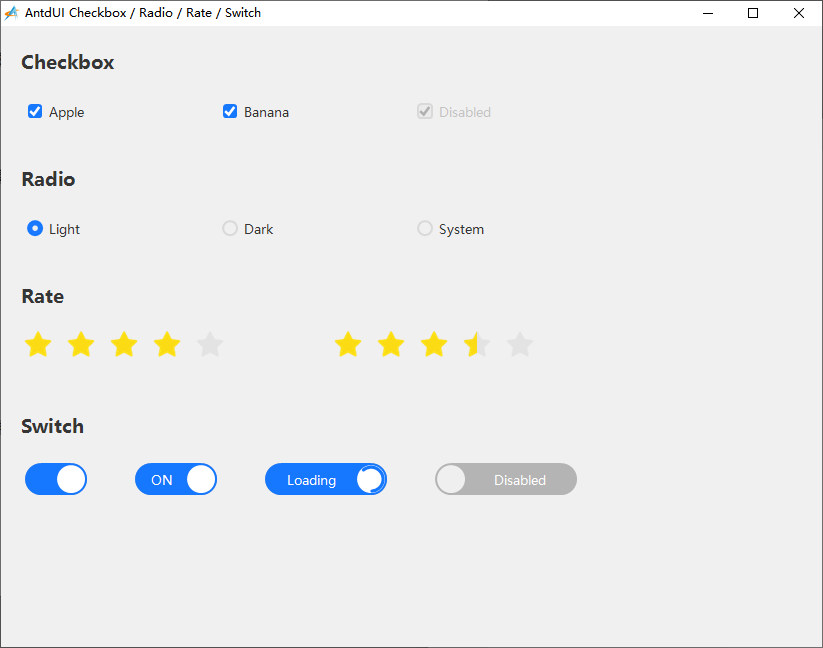
在winform编程中,Checkbox和Radio控件经常用作状态的选择,比如“记住密码”、“自动登录、”全选”,“反选”等功能,故这次把这几个控件放在一起做示例。这几个(Checkbox、Radio、Switch)控件支持CheckedChanged(Rate为ValueChanged)事件响应操作,也可以支持读取Checked属性。另外需要注意的是Radio的编组功能,在同一个winform中是自动编组互斥的,但我们这里是把antdUI控件放到了不同宿主custom中,所以需要手动写下互斥函数。
另外,这里也通过createTitle函数来演示批量创建控件标题到对应的custom控件上。
import win.ui;
import dotNet.AntdUI;
/*DSG{{*/
var winform = win.form(text="AntdUI Checkbox / Radio / Rate / Switch";right=820;bottom=620;border="thin")
winform.add(
custom_base={cls="custom";left=0;top=0;right=822;bottom=620;ah=1;aw=1;db=1;disabled=1;dl=1;dr=1;dt=1;hide=1;z=1};
custom_checkbox_apple={cls="custom";left=20;top=65;right=210;bottom=105;dl=1;dt=1;z=6};
custom_checkbox_banana={cls="custom";left=215;top=65;right=405;bottom=105;dl=1;dt=1;z=7};
custom_checkbox_disabled={cls="custom";left=410;top=65;right=630;bottom=105;dl=1;dt=1;z=8};
custom_lbl_checkbox={cls="custom";left=20;top=18;right=250;bottom=53;dl=1;dt=1;z=2};
custom_lbl_radio={cls="custom";left=20;top=135;right=250;bottom=170;dl=1;dt=1;z=3};
custom_lbl_rate={cls="custom";left=20;top=252;right=250;bottom=287;dl=1;dt=1;z=4};
custom_lbl_switch={cls="custom";left=20;top=382;right=250;bottom=417;dl=1;dt=1;z=5};
custom_radio_dark={cls="custom";left=215;top=182;right=385;bottom=222;dl=1;dt=1;z=10};
custom_radio_light={cls="custom";left=20;top=182;right=190;bottom=222;dl=1;dt=1;z=9};
custom_radio_system={cls="custom";left=410;top=182;right=610;bottom=222;dl=1;dt=1;z=11};
custom_rate_basic={cls="custom";left=20;top=302;right=280;bottom=337;dl=1;dt=1;z=12};
custom_rate_half={cls="custom";left=330;top=302;right=590;bottom=337;dl=1;dt=1;z=13};
custom_switch_basic={cls="custom";left=20;top=433;right=90;bottom=473;dl=1;dt=1;z=14};
custom_switch_disabled={cls="custom";left=430;top=433;right=580;bottom=473;dl=1;dt=1;z=17};
custom_switch_loading={cls="custom";left=260;top=433;right=390;bottom=473;dl=1;dt=1;z=16};
custom_switch_notify={cls="custom";left=130;top=433;right=220;bottom=473;dl=1;dt=1;z=15}
)
/*}}*/

// 创建 AntdUI 消息提示依附的基础窗体。
var baseForm = AntdUI.BaseForm();
baseForm.FormBorderStyle = System.Windows.Forms.FormBorderStyle.None;
baseForm.Dock = System.Windows.Forms.DockStyle.Fill;
dotNet.setParent(baseForm, winform.custom_base);

// ---------- 公共字体与辅助函数 ----------
var fontTitle = System.Drawing.Font("Microsoft YaHei", 14, System.Drawing.FontStyle.Bold);
var fontNormal = System.Drawing.Font("Microsoft YaHei", 10);


var showSuccess = function(text){
    AntdUI.Message.success(baseForm, text);
}

var createTitle = function(host,text){
    var label = AntdUI.Label(host);
    label.Text = text;
    label.Font = fontTitle;
    return label;
}

// ---------- 标题 ----------
var lblCheckbox = createTitle(winform.custom_lbl_checkbox,"Checkbox");
var lblRadio = createTitle(winform.custom_lbl_radio,"Radio");
var lblRate = createTitle(winform.custom_lbl_rate,"Rate");
var lblSwitch = createTitle(winform.custom_lbl_switch,"Switch");

// ---------- 1. Checkbox ----------
var cbApple = AntdUI.Checkbox(winform.custom_checkbox_apple);
cbApple.Text = "Apple";
cbApple.Checked = true;
cbApple.Font = fontNormal;
cbApple.CheckedChanged = function(sender,e){
    showSuccess("Checkbox Apple: " + (sender.Checked ? "checked" : "unchecked"));
}

var cbBanana = AntdUI.Checkbox(winform.custom_checkbox_banana);
cbBanana.Text = "Banana";
cbBanana.Font = fontNormal;
cbBanana.CheckedChanged = function(sender,e){
    showSuccess("Checkbox Banana: " + (sender.Checked ? "checked" : "unchecked"));
}

var cbDisabled = AntdUI.Checkbox(winform.custom_checkbox_disabled);
cbDisabled.Text = "Disabled";
cbDisabled.Checked = true;
cbDisabled.Enabled = false;
cbDisabled.Font = fontNormal;

// ---------- 2. Radio ----------
var radioLight = AntdUI.Radio(winform.custom_radio_light);
radioLight.Text = "Light";
radioLight.Checked = true;
radioLight.Font = fontNormal;

var radioDark = AntdUI.Radio(winform.custom_radio_dark);
radioDark.Text = "Dark";
radioDark.Font = fontNormal;

var radioSystem = AntdUI.Radio(winform.custom_radio_system);
radioSystem.Text = "System";
radioSystem.Font = fontNormal;

// AntdUI.Radio 嵌入到多个 custom 宿主时,建议显式维护互斥逻辑。
var setRadio = function(selected){
    radioLight.Checked = selected == "Light";
    radioDark.Checked = selected == "Dark";
    radioSystem.Checked = selected == "System";
    showSuccess("Radio selected: " + selected);
}

radioLight.CheckedChanged = function(sender,e){
    if(sender.Checked) setRadio("Light");
}

radioDark.CheckedChanged = function(sender,e){
    if(sender.Checked) setRadio("Dark");
}

radioSystem.CheckedChanged = function(sender,e){
    if(sender.Checked) setRadio("System");
}

// ---------- 3. Rate ----------
var rateBasic = AntdUI.Rate(winform.custom_rate_basic);
rateBasic.Count = 5;
rateBasic.Value = 3;
rateBasic.Font = fontNormal;
rateBasic.ValueChanged = function(sender,e){
    showSuccess("Rate value: " + tostring(sender.Value));
}

var rateHalf = AntdUI.Rate(winform.custom_rate_half);
rateHalf.Count = 5;
rateHalf.Value = 4.5;
rateHalf.AllowHalf = true;
rateHalf.AllowClear = true;
rateHalf.Font = fontNormal;
rateHalf.ValueChanged = function(sender,e){
    showSuccess("Half rate value: " + tostring(sender.Value));
}

// ---------- 4. Switch ----------

// 基础开关:无文字,仅展示最简 Switch 用法
var swBasic = AntdUI.Switch(winform.custom_switch_basic);
swBasic.Checked = true;
swBasic.Font = fontNormal;
swBasic.CheckedChanged = function(sender,e){
    showSuccess("Switch Basic: " + (sender.Checked ? "ON" : "OFF"));
}

var swNotify = AntdUI.Switch(winform.custom_switch_notify);
swNotify.CheckedText = "ON";
swNotify.UnCheckedText = "OFF";
swNotify.Checked = true;
swNotify.Font = fontNormal;
swNotify.CheckedChanged = function(sender,e){
    showSuccess("Switch Notify: " + (sender.Checked ? "ON" : "OFF"));
}

var swLoading = AntdUI.Switch(winform.custom_switch_loading);
swLoading.CheckedText = "Loading";
swLoading.UnCheckedText = "Ready";
swLoading.Loading = true;
swLoading.Font = fontNormal;
swLoading.CheckedChanged = function(sender,e){
    showSuccess("Switch Loading: " + (sender.Checked ? "ON" : "OFF"));
}

var swDisabled = AntdUI.Switch(winform.custom_switch_disabled);
swDisabled.CheckedText = "Enabled";
swDisabled.UnCheckedText = "Disabled";
swDisabled.Checked = false;
swDisabled.Enabled = false;
swDisabled.Font = fontNormal;

// ---------- 资源释放 ----------
winform.onClose = function(){
    fontTitle.Dispose();
    fontNormal.Dispose();
}

// ---------- 显示窗口 ----------
winform.show();
win.loopMessage();
下期预告:Select类选择控件的创建

